
From Newborn Trenches to Digital Innovation: How Fatherhood Inspired Our Latest Project

At Emplex, we’ve always believed that the best solutions come from solving real-world problems. Usually, those problems involve complex enterprise architectures or scaling issues. But recently, our colleague Mikołaj found himself facing a different kind of challenge: the "Newborn Trenches."
The 3 AM Realization
When Mikołaj became a dad a few weeks ago, he entered the whirlwind of the first "Kraamweek" (maternity week). In the Netherlands, we are blessed with the support of a Kraamzorg (maternity nurse). Their job is vital, but their data collection? Surprisingly manual.
"I found myself sitting there at 3 AM, cross-eyed from lack of sleep, trying to remember if the last feed was 15 minutes on the left or 20 on the right," Mikołaj says. "The nurse needs this data to ensure the baby is healthy, but the process of tracking it on a desktop sized web app or worse, trying to recall it from memory when she arrives in the morning was a friction point neither parents nor nurses need."
The Problem: The "Clipboard" Gap
During the first eight days, the Kraamzorg tracks everything: feeding duration, diaper counts, temperature, and stool color. This data is used by the nurse, so she knows what to take care of the next day. However, because the parents are the ones awake at night, they become the "data entry clerks" for the nurse.
Mikołaj realized that he wasn't just being a dad; he was an administrative employee. That’s when the developer brain took over. Why are we using old-school web apps and memory when we carry supercomputers in our pockets?
The Solution: DeKraamApp
Inspired by his own exhaustion, Mikołaj began sketching out a solution that would eventually become the blueprint for a new kind of tracking app. The goal was simple: Make it so simple a sleep-deprived parent can do it with one hand while holding a crying baby.
But we didn't stop at just a "tracker." We looked at the broader ecosystem:
- For Parents: A high-UX, dark-mode interface that logs events in seconds.
- For the Kraamzorg: A professional dashboard where she can see a 24-hour summary of all her assigned households the second she walks through the door.
- For Safety: An integrated AI chatbot that uses the nurse’s specific notes to provide safe, context-aware advice to parents in the middle of the night.
So what about a prototype?
To realize a prototype we could pitch to potential investors or customers, we first had to choose a tool and a strategy. The tool of choice was Gemini. The reason? "Papa Mikołaj" needed something he could open instantly on his phone to dump his ideas.
Admittedly, the initial prompt was... well, a bit "cloudy," as you might expect from someone getting two hours of sleep a night. However, we took those raw, vital requirements and reformulated them into a clear, reproducible prompt. This allowed us to bridge the gap between a tired father’s needs and a high-performance React application.
The prompt
Role: You are an expert UI/UX Designer and Senior React Developer specializing in mobile-first applications for sleep-deprived parents.
Goal: Create a comprehensive application (using Tailwind CSS and Lucide React icons) called DeKraamApp. The app serves two distinct user groups:
- Parents: A "Sleepy Parent" optimized tracker for feeding, diapers, and health, featuring an AI Chatbot for 24/7 support.
- Kraamzorg (Maternity Nurses): A robust "Kraamzorg Admin" dashboard to manage multiple households, view family statistics, manage schedules/notes, and review parent-bot interactions.
Core Design Philosophy (The "Sleepy Parent" UX)
- Dark Mode Only: The app uses a deep slate/indigo color palette (
bg-slate-950) to prevent eye strain at 3 AM. - Thumb-Zone Navigation: All primary interactions happen in the bottom 50% of the screen. Big, rounded, tappable buttons (
rounded-3xl,p-5). - One-Tap Speed: Minimize typing. Use presets, toggles, and sliders.
- Retroactive Logging: Every entry screen must have a prominent "Time" adjuster that defaults to "Now" but can be easily changed to "30 mins ago" if the parent forgot to log immediately.
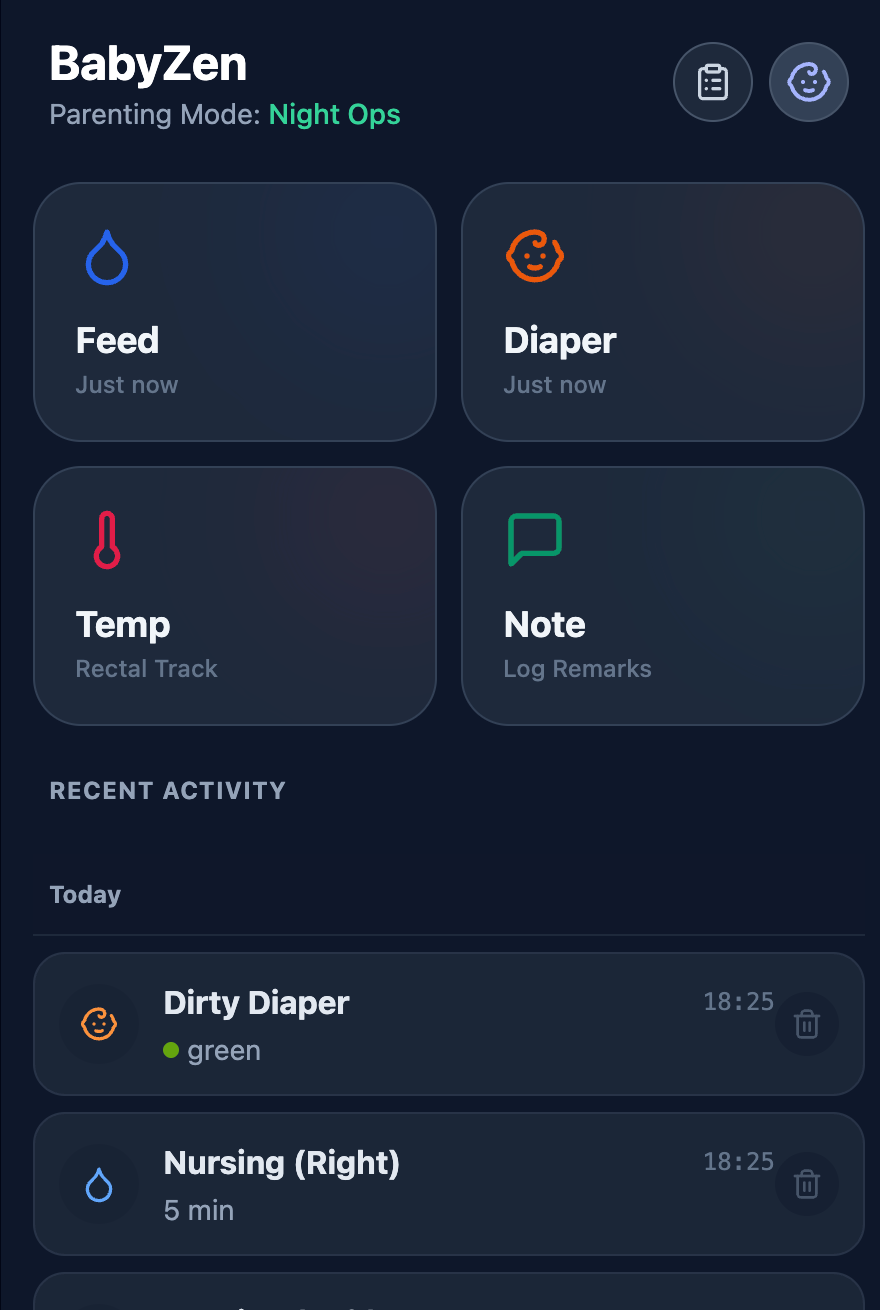
Feature Requirements1. Home Dashboard (Parent View)
- Header: App title + a "Kraamzorg Info" button (icon: Clipboard/Stethoscope) to see nurse notes/schedule.
- Active Status: If a breastfeeding timer is running, show a pulsing indicator bar at the top that shows the elapsed time and allows returning to the timer.
- Main Grid: 4 Giant Buttons: Feed (Blue), Diaper (Orange), Temp (Rose), Note (Emerald).
- Show "Last logged time" (e.g., "2h ago") on the button itself.
- Assistant FAB: A floating action button for the AI Chatbot.
- History List: A list of recent logs below the buttons.
- Day Separators: Visually separate logs from "Today" vs "Yesterday" with a clean line break.
- Delete: Rows can be swiped or have a visible trash icon to delete errors.
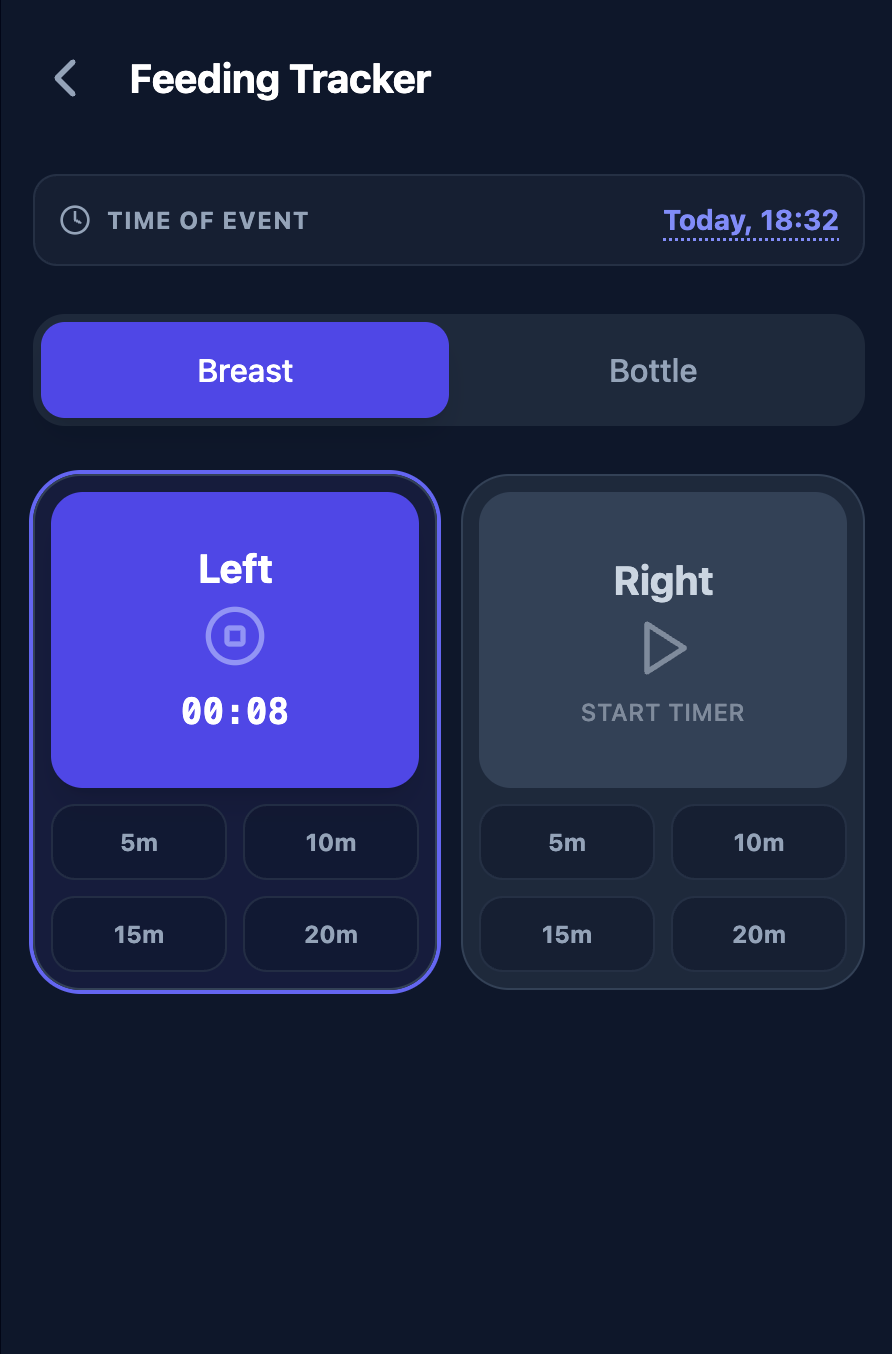
2. Feeding View (Smart & Fast)
- Method Toggle: Breast vs. Bottle.
- Breast:
- Two large buttons: "Left" and "Right".
- Timer: Tapping a side starts a timer. The button pulses. Tapping stop saves the log.
- Quick Add: Below the big buttons, show small chips for
5m,10m,15m,20mto log instantly without a timer.
- Bottle:
- Big number display for amount (ml).
- Slider to adjust amount (10ml - 300ml).
3. Diaper View (Health Check)
- Type: Wet, Dirty, Mixed.
- Poop Analysis: If "Dirty" or "Mixed" is selected, show a color picker:
- Colors: Mustard, Green, Brown, Black, Red, Clay.
- Warning Logic: If Red, Black, or Clay is selected, show a RED WARNING box: "Call Verloskundige (Midwife)" with a reason (e.g., "Red = Possible blood").
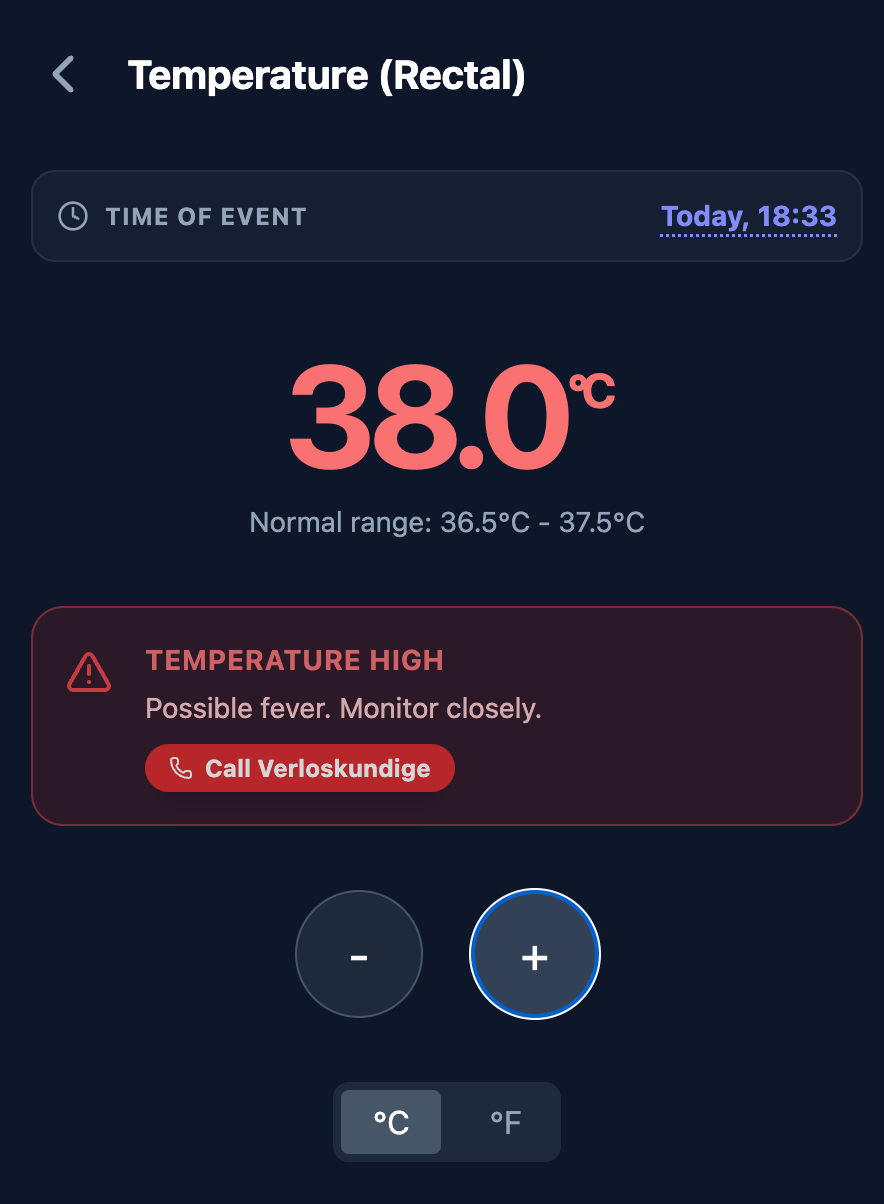
4. Temperature View (Safety First)
- Input: Big +/- buttons to adjust temp by 0.1 degrees.
- Warning Logic:
- If Temp < 36.5°C or > 37.5°C (Newborn range), show a RED WARNING box: "Call Verloskundige" with a phone icon.
5. Kraamzorg Admin (Nurse Dashboard)
- Purpose: A centralized dashboard for the maternity nurse to manage multiple families.
- Household Management:
- List view of active families (Name, Address, Baby Age).
- Ability to add/edit family details (Address, Door Codes, Parking info).
- Nurse Schedule: Set arrival times for the next day so parents know when to expect the nurse.
- Family Overview (Per Household):
- Daily Summary: Total Feeds, Wet/Dirty Diapers, Sleep hours (from notes).
- Medical Alerts: Automatically flagged logs (High/Low Temp, Abnormal Stool) from the last 24h.
- Nurse Notes: A writable text area for the nurse to leave instructions for the parents (e.g., "Keep baby warm," "Try feeding position X").
- Chat Review:
- A read-only view of the conversation history between the Parents and the AI Chatbot to verify advice given and understand parental concerns during the night.
6. AI Care Chatbot (Parent Support)
- Purpose: A smart assistant for parents to ask questions during the night when the nurse is away.
- Context Awareness:
- The bot must have access to:
- The specific family's logs (last feed, temps).
- The Nurse Notes (to reinforce nurse advice).
- Multi-Modal Input:
- Text: Standard chat.
- Audio: Button to record a question or baby sound (simulated upload).
- Image: Button to upload a picture (e.g., of a rash or diaper) for analysis (simulated analysis).
- Safety & Guardrails:
- Strict Medical Disclaimer: "I am an AI assistant. For emergencies, always call 112 or your Midwife."
- Conservative Advice: If the query is medical (high fever, blood), the bot must strictly advise contacting a professional.
- Transparency: Display a notice: "This conversation is saved for your Kraamzorg nurse to review."
Copy paste this into gemini and you'll end up with something like this.
Imagine how much easier the life of our new father and thousands like him could have been with this tool in hand from day one.
Real-World Innovation
At Emplex, we don't just build software; we build tools that matter. Mikołaj’s transition into fatherhood reminds us that innovation doesn't always start in a boardroom. Sometimes, it starts in a nursery, under the glow of a nightlight, with a realization that we can make life a little bit simpler for the people who care for us.
To Mikołaj: congratulations on the new addition to your family. And to all the parents in the trenches: we see you, and we can build something for you.
Are you interested in this project? Do you know someone willing to invest in this idea, or do you represent a healthcare business looking for similar custom software? We’d love to talk. Let us know!